
What to Look for in a LinkedIn Headshot Generator
What to Look for in a LinkedIn Headshot Generator
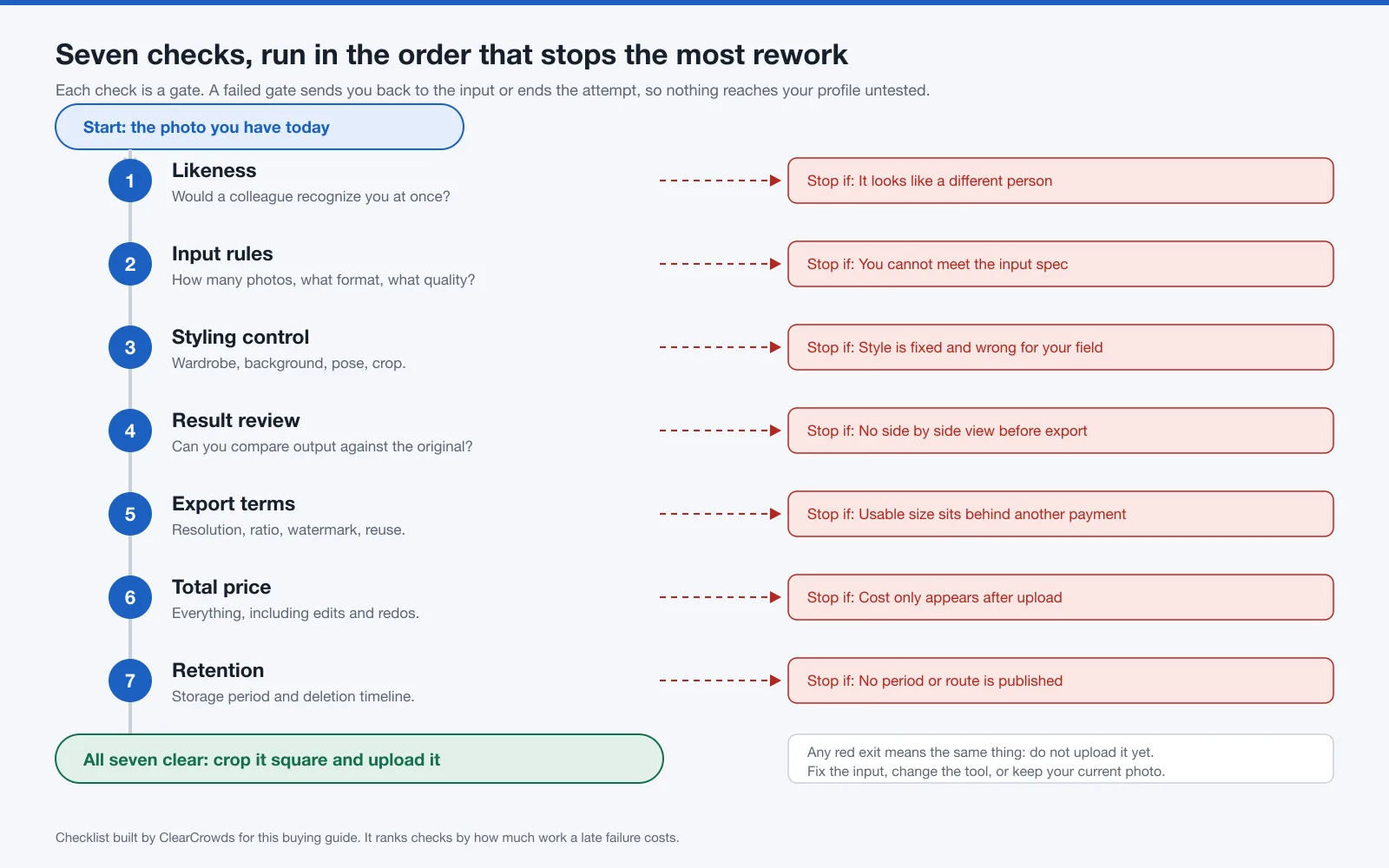
A LinkedIn headshot generator earns its price only if the picture that comes out still reads as you. Before you upload anything, check seven things: recognizable likeness, the input photos the tool requires, how much control you get over wardrobe and background, whether you can review the result against your original for identity drift and visible artifacts, what the export terms allow, the current total price before you hand over photos, and the published retention and deletion policy for your face data.
Create a work-ready headshot
- Original-first review
- LinkedIn-ready crops
- Clear disclosure
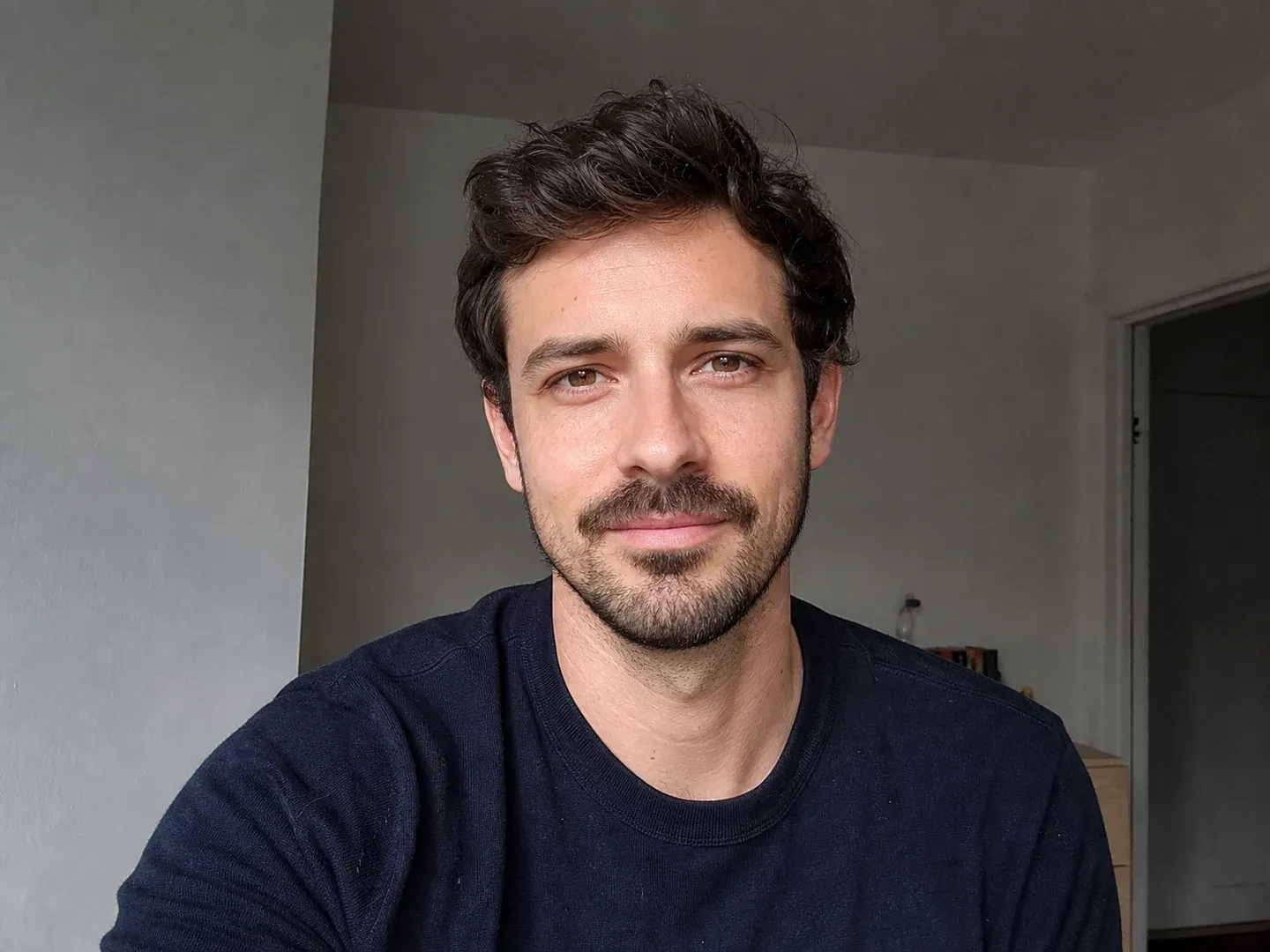
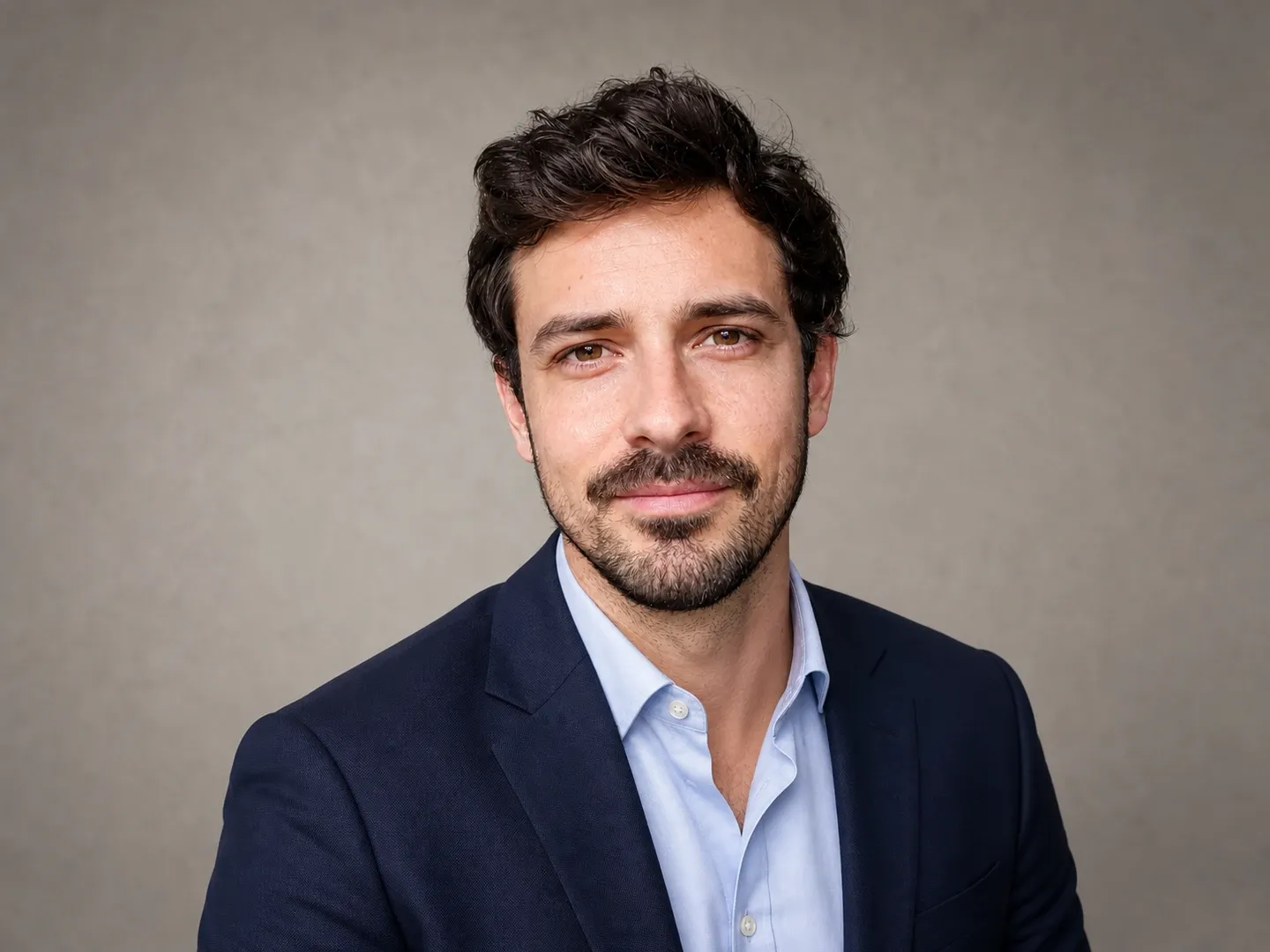
Try a focused portrait workflow, choose a LinkedIn-ready crop, and compare the result with your original before you use it.
LinkedIn's own rule is short. Your profile photo must reflect your likeness. A polished stranger fails that test no matter how good the lighting looks, so treat any generator as a styling step on a current photo of you, and reject output that changes facial structure, age cues, or other identity markers.

Key takeaways
- Likeness is the only check that cannot be fixed later. Run it first, and run it again on the finished file.
- Price and privacy are decided by what a vendor publishes before you upload. Read the pricing page and the privacy page, and record the date you read them.
- A storage cap and a deletion deadline are two separate commitments, and a policy can publish one without the other. Headshot.AI states the shortest periods on this page, 7 days for the selfies you upload and 30 days for the results, and states them in its privacy policy rather than only in marketing copy. HeadshotPro and Aragon AI both land at 30 days for the photos you hand over, by different routes, and HeadshotPro answers a deletion request faster, 14 days against Aragon AI's 30. BetterPic publishes the most detailed table and an instant deletion control, then allows its own numbers to be extended. ClearCrowds publishes neither a cap nor a deadline.
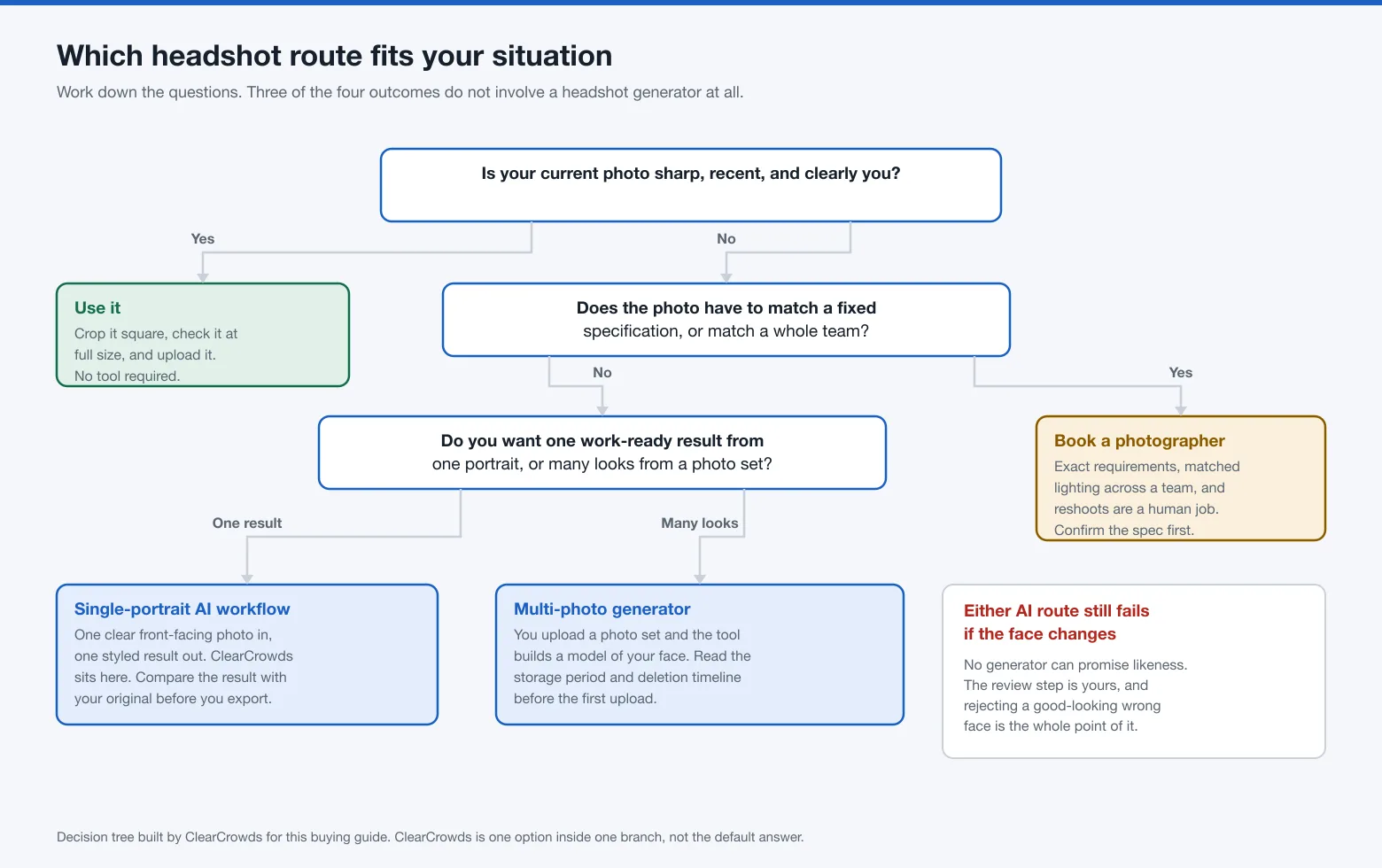
- Shortlist, in order of how little work it takes. If your current photo is sharp, recent, and clearly you, use it. If you want one work-ready result from one clear portrait and will review it yourself, a single-portrait workflow fits. If you want many looks from a photo set, a multi-photo generator fits; how long that set survives is set by the vendor's policy, not by the number of photos, and the published periods run from 7 days to 3 years. If the photo has to satisfy a fixed specification or match a whole team, hire a photographer.
- ClearCrowds publishes this guide and is one of the options in it, scored on the same criteria as everything else.
- No tool on this page can promise that a result looks like you. The review step belongs to you.
Table of contents
- What a LinkedIn headshot generator does
- How we evaluated these options
- The seven checks to make before uploading
- Start with LinkedIn's likeness requirement
- Decision matrix: who should choose which route at a glance
- Compare tools with the same evidence fields
- Option profiles: best for, limits, and who should skip
- Reject identity drift and visible artifacts
- When a real photo or photographer is the better choice
- Where ClearCrowds fits and where it does not
- Limitations of this guide
- Frequently asked questions
What a LinkedIn headshot generator does
A LinkedIn headshot generator takes one or more photos of you and produces a styled portrait aimed at a work profile: business clothing, even lighting, a plain background, and a square crop. Some tools work from a single clear portrait. Others ask for a set of photos, build a model of your face from that set, and generate many variations from it.
Either way, the image is generated. No camera recorded the face you are about to publish, so the usual assumption that a photo shows what you look like does not carry over.
How we evaluated these options
Scope: tools that publicly support a LinkedIn or professional headshot workflow, plus two routes that involve no generator at all, a current photo you take yourself and a professional photographer.
Method: desk research with a 2026-08-02 cutoff for scope and criteria. Every vendor's public pricing and privacy pages were opened again in an ordinary browser on 2026-08-07 Beijing time, and every fact below is dated. No hands-on cross-tool test was performed, so this guide contains no quality ranking and no claim about which tool produces better-looking faces.
Evidence mode: desk research. Where a vendor page could not be read, the field stays unknown. Nothing here is filled in from a review site, a roundup, or an AI summary.
One note, because this part is easy to get wrong: an error code is not the same as a missing policy. A scripted request to headshot.ai comes back as HTTP 429 with a page titled Vercel Security Checkpoint that reads "We're verifying your browser". That is bot protection, not an outage, and the same URL opens normally in a browser with the privacy policy sitting right there. Every page cited below was opened in a browser before a single field was recorded from it. Do the same on your own shortlist.
Criteria and weights, fixed before any tool was examined:
| Criterion | Weight | What it measures |
|---|---|---|
| Likeness safeguards | 30% | Whether the workflow gives you a way to catch a face that has drifted |
| Input and control transparency | 15% | Whether input requirements and styling choices are stated up front |
| Result review and export | 15% | Whether you can compare against the original and export a usable file |
| Price clarity | 15% | Whether the full cost is knowable before you upload |
| Retention and deletion clarity | 15% | Whether a storage period and a deletion timeline are published |
| LinkedIn fit | 10% | Whether the output suits a square, small, face-forward profile slot |
Likeness carries the largest weight because it is the one failure a reader cannot repair after the fact. Unknowns score nothing. A missing published policy is treated as a missing policy, and that rule is applied to ClearCrowds too.
Affiliation: ClearCrowds publishes this guide, and the ClearCrowds professional headshot route is one of the options evaluated here under the same criteria as everything else.
The seven checks to make before uploading
| # | Check | What good looks like | Reject if |
|---|---|---|---|
| 1 | Likeness | The result is recognizably you at profile size and at full size | The face reads as a different person, or your age, build, or features shift |
| 2 | Input requirements | Photo count, format, resolution, and framing are stated before signup | You only learn the requirements after paying or uploading |
| 3 | Controllable styling | You can choose wardrobe direction, background, pose, and crop | One fixed style that does not match your field |
| 4 | Result review | You can compare the result with your original before exporting | The tool only shows a small preview or a finished grid |
| 5 | Usable export | You can get a PNG or JPG of at least 400 x 400 pixels and under 8 MB, with watermark and reuse terms stated | A usable file needs a second purchase you were not told about |
| 6 | Current total price | Base price plus edits, redos, and upscales is visible before upload | The price appears only after your photos are on their servers |
| 7 | Retention and deletion | A storage period, a deletion route, and a deletion timeline are published | Neither a period nor a route is stated anywhere public |
Run them in that order. A failure at check 1 makes the rest irrelevant, and check 7 is the one most people get to only after their photos are already uploaded.
Start with LinkedIn's likeness requirement
LinkedIn's profile photo guidance sets the boundary before any tool does. The profile photo guidelines page says you may use an illustration, caricature, or other artistic rendering of yourself, and that your profile photo must reflect your likeness. It adds that LinkedIn may remove profile photos that do not comply with its User Agreement and Professional Community Policies, including images that consist solely of company logos, emojis, landscapes, animals, words or phrases, flags, childhood or baby photos, and other people's likenesses such as stock imagery, photos of celebrities, and depictions of fictional characters.
Those two words, consist solely, matter. The list describes photos that are entirely something else, and a styled portrait of you is not on it.
The Professional Community Policies put the boundary more directly: do not use an image of someone else, or any other image that is not your likeness, for your profile photo.
Read together, those two pages allow a generated portrait as a rendering of you and rule out a generated portrait that no longer depicts you. That distinction, checked on 2026-08-07, is the whole test.
The file specification is separate and easy to check. LinkedIn's photo upload requirements state a profile photo must be PNG or JPG, between 400 x 400 and 7680 x 4320 pixels, and no larger than 8 MB, and that you can adjust the photo after uploading. Any generator that cannot hand you a file inside those bounds has failed a solvable problem.
Decision matrix: who should choose which route at a glance
Four routes, the same six criteria, and no numeric scoring, because a hands-on quality test was not performed and inventing scores would only dress up an opinion.
| Criterion | Multi-photo generator | Single-portrait workflow | Your own current photo | Photographer |
|---|---|---|---|---|
| Likeness safeguards | Generated; your review is the only safeguard | Generated; your review is the only safeguard | Highest, it is a photograph of you | Highest, plus you can reshoot on the spot |
| Input and control transparency | Photo set required; Headshot.AI asks for 8 to 12 chest-up selfies and BetterPic for 8, and styles are usually preset bundles | One clear portrait; style, pose, and crop chosen per run | Fully yours | Discussed before the session |
| Result review and export | Varies; check whether the original is shown beside the result | Result opens for comparison and further editing | Immediate | Proofs and revisions by agreement |
| Price clarity | Package or subscription prices published; edit and redo allowances differ by package, and extra ones carry their own listed price | Varies; the ClearCrowds route publishes a free plan, a membership, and one-time point packs, but no per-headshot cost | Free | Quoted per session |
| Retention and deletion clarity | Published windows run from 7 days for input photos to 3 years for a trained model; see the table below, and note that a face model can outlive the photos it was built from | Weakest of the routes here: ClearCrowds publishes no maximum period and no deletion timeline, only a support request route | Nothing leaves your device | Contract and studio policy |
| LinkedIn fit | Many variations to choose a square crop from | Square and badge crops chosen at export | Depends on your framing | Framed to spec |
If two criteria matter more to you than they do to us, reweight them and the answer changes, which is why the weights above are written down.
Compare tools with the same evidence fields
Record the same fields for every tool, from the vendor's own pages, and date each one. Anything you cannot read stays unknown.
All rows below were read on 2026-08-07 Beijing time.
| Tool | Pricing model as published | Longest storage period stated | Deletion route and timeline stated |
|---|---|---|---|
| Aragon AI | Subscription plus credits, with a limited free experience; unused monthly credits do not roll over | Face data deleted or anonymized within 30 days of the earliest of five triggers. Delivery of the content you requested is one of them, so a reader who is not on an active subscription is at 30 days; the policy allows a subscriber's face data to be kept until the subscription ends, capped by one year from collection | Account settings or the privacy rights portal; within 30 days of the request |
| BetterPic | Three packages on the pricing page, each labelled "ONCE, for 1 person". Each includes an AI edit allowance that rises with the tier, and the top tier adds unlimited human edits on one photo plus one free redo. The same page states that further edits and further redos are each priced per item | Input photos up to 1 year; the model built from your photos up to 3 years; output photos up to 3 years. The policy adds that these periods may be extended for unlimited time for certain packages | Instant deletion through the interface or customer success; account data within 90 days once the request is processed |
| Headshot.AI | Three one-time packages on the pricing page, sold under an All Packages Include list that reads "no subscriptions", full image rights, and a money-back guarantee | Uploaded images encrypted and deleted 7 days after upload; generated headshots deleted from the servers after 30 days; support correspondence up to 12 months. Both photo periods sit in the privacy policy itself, Section 4, and are repeated on the homepage | Immediate deletion of all associated data, requested from your own dashboard; no waiting period attached to it |
| HeadshotPro | Packages sold under the line "Pay once, no subscription", with a plan table row stating credits and packages never expire | Input photos auto-delete 30 days after generation, on the homepage trust section, the pricing page trust card, and both FAQs. The pricing page FAQ says uploaded selfies and generated results auto-delete after 30 days; the plan table on that same page lists automatic results deletion (30-day) as Optional on Team and Enterprise and shows none on Individual. The privacy policy sets no maximum and keeps information as long as necessary to provide the service | Delete your account or make an explicit request; within 14 days once confirmed |
| ClearCrowds | Free plan, membership, and one-time point packs | No maximum stated; information is kept as long as reasonably needed to run the service and meet legal, dispute, abuse, and record-keeping needs | Contact support for account or data assistance; no timeline published |
One note on how to read that table. On retention clarity the Headshot.AI row is the strongest of the five and the ClearCrowds row is the weakest. That is what applying the same criteria to ourselves produced.
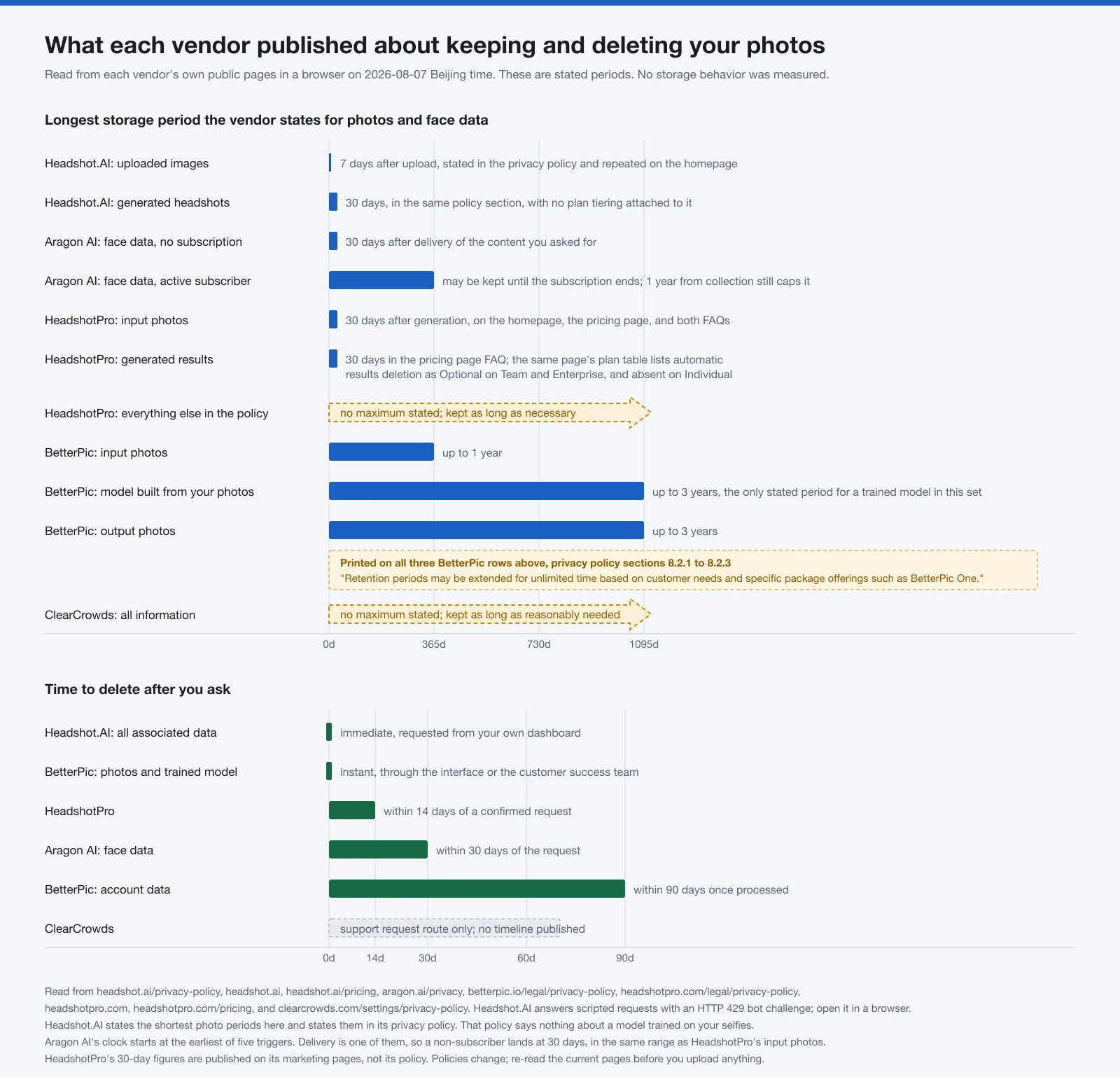
Two things stand out. Published periods for the same kind of file are nowhere near each other: the selfies you hand over get 7 days at Headshot.AI and up to a year at BetterPic. And the open-ended rows, where no ceiling was published at all, include ours.
Headshot.AI states the shortest periods, and states them in the document that binds. Section 4 of its privacy policy, effective July 21, 2026, reads "Uploaded Images: Encrypted and deleted 7 days after upload." and "Generated Headshots: Deleted from our servers after 30 days." The deletion route is the line directly under those: "Users can request immediate deletion of all associated data from their dashboard." A control you operate, not a ticket you file. What Section 4 never mentions is a model. It lists uploaded images, generated headshots, account metadata, and support correspondence, then stops, so if something is trained on your selfies there is no published period for it. BetterPic is the only option here that puts a number on that, and the number is three years.
HeadshotPro and Aragon AI both land at 30 days for uploads, a bit over four times Headshot.AI's period, by different routes. HeadshotPro counts from generation. Aragon AI counts from the earliest of five triggers, the first being delivery of the content you requested, so a reader without an active subscription is on that same 30-day clock; the gap opens only for subscribers, whose face data may be kept until the subscription ends, capped at one year from collection. On a deletion request HeadshotPro is quicker, 14 days against Aragon AI's 30.
Where those two differ is placement. Every HeadshotPro 30-day figure lives on a marketing page. Its privacy policy carries none of them, sets no maximum, and keeps information as long as necessary. Headshot.AI's equivalent numbers are in its policy, which is the same commitment in a stronger place. HeadshotPro's pricing page also disagrees with itself on the finished images: the FAQ says uploaded selfies and generated results auto-delete after 30 days, while the plan table further up lists automatic results deletion (30-day) as Optional on Team and Enterprise and blank on the Individual plans, which is where a single LinkedIn buyer lands. Confirm which statement covers your plan before you upload.
BetterPic publishes the most detail and the largest asterisk: 1 year for input photos, 3 years for the trained model, 3 years for output photos, plus instant deletion in its interface. Sections 8.2.1, 8.2.2, and 8.2.3 each end with the same line: "Retention periods may be extended for unlimited time based on customer needs and specific package offerings such as BetterPic One." Aragon AI's face data clause carries no equivalent. ClearCrowds publishes neither a cap nor a deadline.
Sources for these rows are the Aragon AI privacy policy, the BetterPic privacy policy, the Headshot.AI privacy policy, the HeadshotPro privacy policy, the HeadshotPro pricing page, and the ClearCrowds privacy policy.
Option profiles: best for, limits, and who should skip
Same five fields for every option, in the same order, including ours. Everything in them comes from the pages linked above, read on 2026-08-07 Beijing time.
Aragon AI. Best for someone who wants a written outer limit on how long face data can exist and is comfortable paying by subscription. Its pages establish a subscription plus credits, a limited free experience, credits that do not roll over month to month, the five-trigger face-data clause in the table above, and deletion through account settings, a privacy rights portal, or support. The limit on that evidence: the policy expressly suspends the delivery trigger for an active subscription user, allows face data to be retained until the subscription ends, and leaves one year from collection as what caps it. Price model: subscription plus credits, published. Skip it if you want a single purchase and no recurring plan, or if lapsing unused credits would annoy you.
BetterPic. Best for someone who wants a large style range from one order and an instant deletion control inside the product. Its pages establish three packages, each labelled "ONCE, for 1 person" on the pricing page, an AI edit allowance included in every package that rises with the tier, unlimited human edits on one photo plus one free redo at the top tier, a per-item price for any further edit or redo, a 7-day refund window, and the most detailed retention table in this set. The limit on that evidence: all three of its photo and model rows carry the same extension sentence, so the published numbers are defaults rather than ceilings. Price model: packages billed once, published, with an included edit allowance and priced extras beyond it. Skip it if you need a hard maximum on how long a model of your face can exist.
Headshot.AI. Best for someone whose first question is how long a company holds on to their selfies. Its pages establish the shortest published periods in this set, in the privacy policy rather than beside a checkout button, plus immediate deletion of all associated data from your dashboard. The homepage repeats both photo figures in a panel headed Auto-Delete Built In, asks for 8 to 12 chest-up selfies at eye level, and has you pick attire and background before anything runs. The limit on that evidence: Section 4 says nothing about a model trained on those selfies, so the 7-day number covers the files you sent and not necessarily what was learned from them; and the site answers scripted requests with an HTTP 429 bot challenge, so a monitoring tool will report it broken when it is not. Price model: three one-time packages, published under a list that reads "no subscriptions", with full image rights and a money-back guarantee. Skip it if you would rather hand over one photo than a dozen, or if you need a published period for the trained model the way BetterPic gives you.
HeadshotPro. Best for teams, and for anyone who wants a one-time purchase with a deletion deadline written into the privacy policy rather than left open. Two options beat it on speed: BetterPic's in-product instant deletion and Headshot.AI's dashboard deletion both undercut HeadshotPro's 14 days, and Headshot.AI puts its storage periods in the policy while HeadshotPro's sit on marketing pages. Its pages establish packages sold under the line "Pay once, no subscription", credits that never expire, team pricing with volume discounts, a money-back guarantee, dozens of results per order, and a built-in editor with per-platform crops. The limit on that evidence: none of the 30-day figures appear in the privacy policy, which sets no maximum; and the pricing page's two statements about generated results do not agree for a single buyer, as the section above sets out. Price model: packages billed once, published; credits never expire. Skip it if you need the storage cap written into the privacy policy rather than the marketing pages, which is where Headshot.AI puts it.
ClearCrowds. Affiliated option; we publish this guide. Best for someone with one usable portrait who wants a work-ready style and an exact crop. Its pages establish a single-portrait upload as JPG, PNG, or WebP, seven work-ready directions plus a pose, crops for LinkedIn, a resume, an employee badge, a team page, or a custom ratio, and a result that opens in the editor beside the original. The limit on that evidence: retention is the weakest of the five profiled here, with no maximum period and no deletion deadline; and the pricing page states that point usage depends on the selected model and workflow, so the cost of one headshot is not published. Price model: free plan, membership, and one-time point packs, published on the pricing page. Skip it if you want dozens of variations from a photo set, or if you need a published storage ceiling before you upload.
Reject identity drift and visible artifacts
Identity drift is the slow slide from your face to a plausible face. It survives a thumbnail and falls apart at full size, which is exactly backwards from how most people review a headshot.
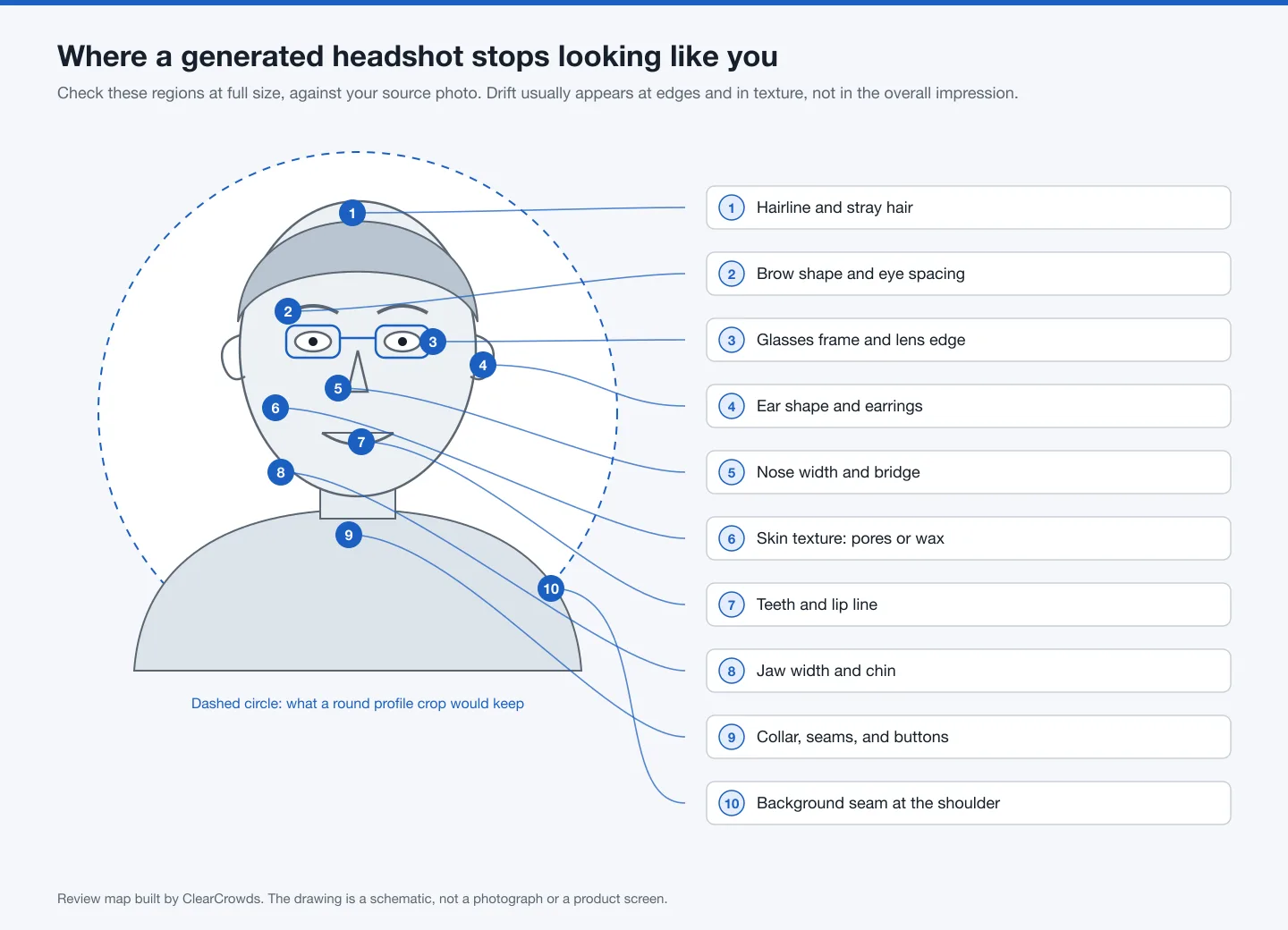
Open the result at full size, beside your source photo, and work through the ten regions on that map in order. Do not judge any of this at profile-thumbnail size.
- Hairline and stray hairs against the background. Soft, painted edges are a common tell.
- Brow shape and the distance between the eyes. Small changes here move perceived identity a long way.
- Glasses. Look for frames that change thickness, arms that vanish behind the head, and lens edges that do not refract anything.
- Ears and any earrings, which generators often simplify or duplicate.
- Nose width and the bridge.
- Skin texture at full size. Visible pores and fine lines are correct; an even, waxy surface is a failure.
- Teeth and the lip line.
- Jaw width and chin. These carry recognition more than skin tone does.
- Collar, seams, and buttons. Clothing that merges into the neck is a rendering error.
- The background where it meets your shoulder and hair, for seams or smeared patches.
Two checks close the review and are not on the map. Check the crop: profile slots are small and often round, so keep anything that matters away from the corners and make sure the frame does not clip the top of your head. Then apply the recognition test. If a colleague who saw you last week would hesitate, reject it and try again with a better source photo.
A result that fails any step is not a small edit away from being usable. Regenerate it, change the input, or stop.
When a real photo or photographer is the better choice
Skip the generator entirely when any of these is true.
- You already have a sharp, recent photo where you look like yourself. Cropping it square costs nothing and makes every other check on this page unnecessary. If you would rather shoot a fresh one, the setup is straightforward at home: our guide to taking professional headshots at home covers lighting, camera height, clothing, and backgrounds.
- The photo has to meet a fixed specification set by an employer, a badge system, or an organization with its own rules. Confirm the requirement at the source first, and do not assume a generated image satisfies it.
- A whole team needs to match. Consistent lighting, framing, and background across a department is what a booked session buys you. Separate uploads drift, and the mismatch shows on a team page.
- Your appearance is hard for a generator to keep stable: textured or long hair, a head covering, visible medical devices, distinctive glasses, or a wardrobe that carries meaning in your field.
- You want direction. A photographer can adjust expression, angle, and posture while shooting, which no post-processing step replaces.
Where ClearCrowds fits and where it does not
Disclosure first: ClearCrowds publishes this guide. What follows describes a route. Weigh it against the four profiles above, and discount our summary of ourselves accordingly.
The ClearCrowds professional headshot workflow is a single-portrait route. Its published behavior, checked on 2026-08-07: you upload one clear front-facing portrait as JPG, PNG, or WebP; you choose one of seven work-ready directions along with a pose and a crop sized for LinkedIn, a resume, an employee badge, a team page, or a custom ratio; the result opens in the editor so you can compare facial details with the original before you download. The page says the workflow is instructed to preserve recognizable facial features, age cues, skin tone, and expression, and that results can vary. That is a stated instruction, not a guarantee.
It fits when you have one usable portrait, you want a work-ready style and an exact crop, and you intend to run the review in the section above yourself.
Who should skip it:
- You want dozens of variations from a photo set. A multi-photo generator is built for that; this route is not.
- You need a published maximum storage period or a stated deletion timeline before you upload. ClearCrowds publishes a deletion request route through support and no timeline, which is weaker than what all four of the other options publish. Headshot.AI states 7 days for uploaded images, 30 days for generated headshots, and immediate deletion from your own dashboard; HeadshotPro states 30 days for input photos and 14 days after a confirmed request; Aragon AI states 30 days from the earliest of its five triggers and 30 days from a request; BetterPic offers instant deletion in its interface. ClearCrowds states none of those numbers. If retention is the criterion you weight highest, read Headshot.AI's policy first, not ours.
- You need the exact cost of one headshot before you buy. The pricing page publishes the free plan, the membership, and the point packs, and it also says point usage depends on the selected model and workflow, so the per-headshot figure is not there.
- You need a guarantee that the output preserves your identity. Nobody on this page can offer that.
- Your current photo is already good. Use it.
If the fit paragraph describes you and the skip list does not, open the professional headshot workflow, then reject any result that changes how you are recognized.
Limitations of this guide
- Desk research only. No headshot was purchased, generated, or compared across tools for this article, so nothing here ranks output quality.
- Prices and policies change. Every dated fact was read on 2026-08-07 Beijing time and may already differ.
- Every retention period here is what a vendor publishes, not what it does. Nothing in this guide measures whether a file was actually deleted on schedule, and none of these policies was independently audited.
- One field is thinner than it looks. BetterPic is the only option here that puts a separate number on the model trained from your photos, and that number is 3 years. Aragon AI writes about "face data" without breaking a model out of it, and Headshot.AI's Section 4 does not mention a model at all. A short deletion period for photos is not automatically a short deletion period for what was learned from them.
- Vendor pages establish their own features and terms. They do not establish that one tool preserves likeness better than another, and this guide makes no such comparison.
- Deliberately absent: dollar figures. Package prices move often enough that a number published today misleads a reader next quarter, so the table records pricing models and points you at the current page. That rule is applied to every option, ClearCrowds included.
- Written by Maya Chen for ClearCrowds, which makes this a guide with a stake in one of its own entries. The criteria and weights are published above so you can rerun the comparison with your own.
Frequently asked questions
Can I use an AI-generated headshot on LinkedIn?
LinkedIn's profile photo page allows an illustration, caricature, or other artistic rendering of yourself and requires that the photo reflect your likeness. A generated portrait that still looks like you fits that description. One that reads as a different person does not, and the Professional Community Policies specifically tell members not to use an image that is not their likeness as a profile photo.
How can I tell whether an AI headshot still looks like me?
Compare it against the source at full size, region by region: hairline, brows and eye spacing, glasses, ears, nose, skin texture, teeth, jaw and chin, collar, and the background seam. Then apply the recognition test. Hesitation from someone who knows you is a failure, even when the image is attractive.
What should I check before uploading selfies to a headshot generator?
Read the pricing page and the privacy page first. You want the full cost including edits and redos, the storage period, whether the tool builds and keeps a model of your face, the deletion route, and how long deletion takes. Read the fine print under any stated period, because at least one policy in this comparison allows its numbers to be extended. Record the date you checked.
Is one source photo enough for a reliable professional headshot?
It depends on the route you pick. Single-portrait workflows treat one clear front-facing photo as the reference and produce one styled result. Multi-photo generators want a set, build a model from it, and generate many variations. More inputs mainly buy variety and put more of your photos on someone else's server; how long they stay there is set by that vendor's retention policy, not by the number you sent. Neither approach guarantees that the result looks like you, which is why the review step stays yours.
References
- Official help center: Profile photo guidelines and conditions
- Official policy: Professional Community Policies
- Official help center: profile photo file specifications
- Aragon AI pricing and plan questions
- Aragon AI privacy policy, face data retention
- BetterPic pricing and package questions
- BetterPic privacy policy, specific retention periods for user data
- Headshot.AI privacy policy, Section 4 data retention, effective July 21, 2026
- Headshot.AI pricing, package tiers and what every package includes
- Headshot.AI homepage, upload requirements and the Auto-Delete Built In panel
- HeadshotPro packages, plan comparison table, trust card, and FAQ
- HeadshotPro homepage, trust section and FAQ, 30-day input photo auto-delete
- HeadshotPro privacy policy, retention of information
- ClearCrowds AI professional headshot workflow: /features/ai-professional-headshot
- ClearCrowds pricing, plans, and point packs: /pricing
- ClearCrowds privacy policy, sharing and retention: /settings/privacy-policy
- ClearCrowds, how to take professional headshots at home: /posts/how-to-take-professional-headshots-at-home