Direct answer
What is Indoor Environment?
Indoor Environment turns an uploaded photo into a polished ClearCrowds edit using the selected Environment & Scene preset.
Environment & Scene
Use Indoor Environment when you want a quick environment & scene edit without setting up the workflow by hand.
This preset is already selected.
Direct answer
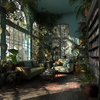
Indoor Environment turns an uploaded photo into a polished ClearCrowds edit using the selected Environment & Scene preset.
Workflow
Start with a clear photo where the main subject, face, outline, and important details are visible at a useful size.
Indoor Environment applies the selected look while keeping the recognizable subject, composition, and core identity cues from the uploaded photo.
Check the face, hands, hairline, subject edges, clothing, and background for unwanted changes before saving or sharing the result.
Use cases
Try it
ClearCrowds passes the preset into the editor so the workflow is ready when your photo opens.
This preset is already selected.
Frequently asked questions
Indoor Environment is a ClearCrowds preset in the Environment & Scene category.
Yes. Upload a photo and ClearCrowds opens the editor with this preset selected.