Direct answer
What is Enhance?
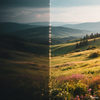
Enhance turns an uploaded photo into a polished ClearCrowds edit using the selected Common preset.
Common
Use Enhance when you want a quick common edit without setting up the workflow by hand.
This preset is already selected.
Direct answer
Enhance turns an uploaded photo into a polished ClearCrowds edit using the selected Common preset.
Workflow
Upload the highest-quality original you have, without screenshots or repeated compression when the source file is available.
Enhance performs the selected correction or export task while preserving the photo's content and avoiding unrelated redesigns.
Inspect fine texture, edges, skin, text, color, and contrast at full size. Compare the output with the source, not only the small preview.
Use cases
Try it
ClearCrowds passes the preset into the editor so the workflow is ready when your photo opens.
This preset is already selected.
Frequently asked questions
Enhance is a ClearCrowds preset in the Common category.
Yes. Upload a photo and ClearCrowds opens the editor with this preset selected.