
Can You Remove an Emoji Covering Someone's Face Without Changing the Person?


Try the emoji cleanup tool
Upload the photo, select only the emoji area, and review whether the face still looks like the same person.
View tool details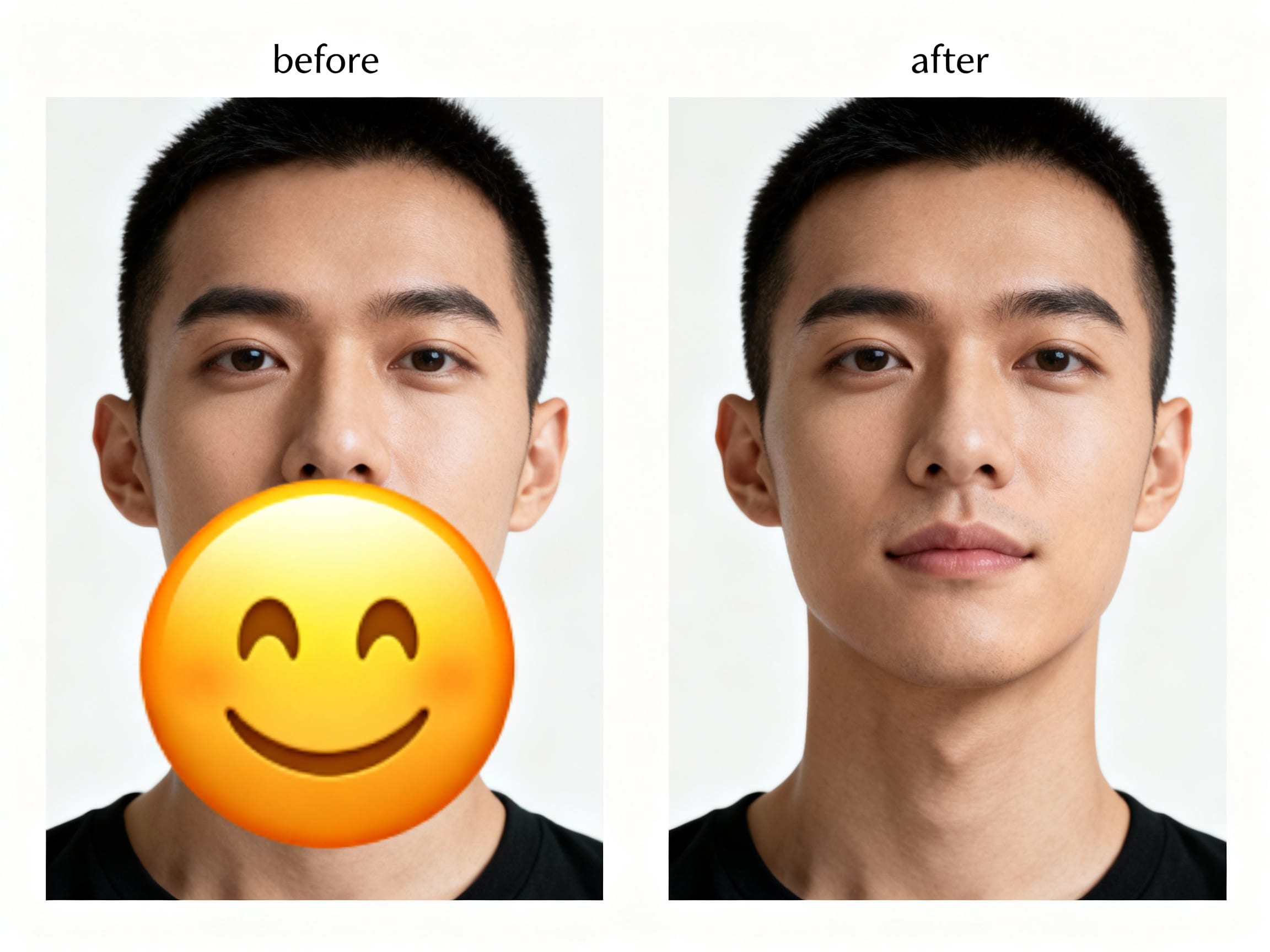
Direct answer
AI can sometimes remove an emoji covering part of a face, but it cannot recover the exact hidden pixels if the emoji fully covered the mouth, eyes, nose, or skin texture. The editor is reconstructing a plausible face area from the visible context. That means the result may look natural, but it still needs careful review because identity, expression, and small facial details can change.
Use this kind of edit only on a photo you own or have permission to edit. If the emoji was added to protect someone's privacy, do not remove it without consent. If you need to protect privacy yourself, use Blur Faces instead of trying to reveal the person.
For general sticker cleanup, start with Remove Stickers and Emojis from Photos. If your current photo has a small emoji, sticker, label, or object covering a face area, try the focused Emoji & Stickers cleanup preset.
Try the emoji cleanup tool
- Small selections
- Identity review
- Privacy-safe guidance
Upload the photo, select only the emoji area, and review whether the face still looks like the same person.
A real photo problem
This usually happens with a photo that was shared casually first and needed later for a different purpose.
Maybe a friend put a smiley emoji over a face before posting a group photo. Maybe a marketplace seller covered their face in a mirror photo and now wants a cleaner product image. Maybe an old saved image has a reaction sticker blocking the mouth or chin. The question is not just "Can I erase the emoji?" The better question is whether the face after the edit still represents the same person and the same moment.
What AI is actually doing
When an emoji covers a face, the hidden part of the image is gone from the visible file. AI does not reveal the original detail under the sticker. It uses nearby pixels, face shape, lighting, symmetry, and the remaining visible features to rebuild a likely result.
That can work well when:
- The emoji covers a small area such as the cheek, chin, forehead, or edge of the face.
- The rest of the face is visible and well lit.
- The photo has enough resolution for skin texture, shadows, and facial lines.
- The edit does not need to prove someone's identity.
It becomes risky when:
- The emoji covers both eyes, the whole mouth, or most of the face.
- The photo is blurry, compressed, or heavily filtered.
- The person is turned sideways and only a small face area remains visible.
- The final image will be used for ID, dating, hiring, legal, medical, school, or public reputation contexts.
When you should not remove the emoji
Do not remove an emoji or sticker from a face when it was clearly added for privacy or consent reasons. A covered face may mean the person did not want to be identified in that copy of the photo.
Also avoid this edit when the output could mislead someone about who was present, what expression they had, or what they consented to share. If the hidden area matters, use the original unedited photo, ask for permission, crop the image, or keep the face hidden.
A safer workflow
Use a conservative workflow:
- Start with the highest-quality copy of the photo.
- Select only the emoji or sticker, plus a tiny edge around it.
- Avoid selecting the whole face unless you intend to rebuild the whole portrait.
- Run one cleanup pass.
- Compare the result with the visible parts of the original face.
- Look closely at eye shape, mouth shape, jawline, skin texture, lighting, and expression.
- If the person looks different, undo it or keep the emoji.
Small selections matter. If you select too much, the editor has more freedom to invent a new expression or reshape the face. If you select only the sticker, the model has a clearer job: remove the graphic and preserve everything else.
Prompt examples
Use a narrow instruction:
Remove only the emoji sticker from the face. Preserve the person's identity, facial proportions, skin texture, lighting, expression, hair, and background. Do not change any visible facial features outside the sticker area.
If the emoji is near the mouth:
Remove the emoji from the lower face and reconstruct a natural mouth and chin that match the visible face. Keep the result conservative and preserve the original lighting and skin texture.
Avoid broad prompts like:
Make this face look better.
That can change the face instead of only removing the emoji.
How to review the result
Before saving or sharing, ask:
- Does the person still look like the same person?
- Did the edit change their expression?
- Are the eyes, mouth, nose, chin, and face shape consistent with the visible original?
- Is the skin texture too smooth or too different from nearby skin?
- Are there strange shadows, duplicated features, or asymmetry?
- Would the person be comfortable with the emoji removed?
If any answer is uncertain, keep the original privacy mark or use a crop instead.
How this fits with ClearCrowds
ClearCrowds is useful when the hard part is removing the visible sticker or emoji without damaging the nearby photo. Use Emoji & Stickers for graphic overlays and Remove Text when the covering element is a caption, label, or date text.
If the issue is a background object, use the broader object removal guide. If the goal is to hide a face rather than reveal it, use Blur Faces.
Frequently asked questions
Can AI reveal the real face under an emoji?
No. AI cannot recover exact hidden pixels from the visible file. It can only reconstruct a plausible face area based on the surrounding photo.
Is it okay to remove an emoji from someone else's face?
Only with permission. If the emoji was added for privacy, consent, or safety, keep it or ask the person before editing.
What if the emoji only covers the cheek?
That is usually a better case. The model can rebuild simple skin texture more reliably than eyes, teeth, lips, or facial expression.
What if the emoji covers the mouth?
Mouth reconstruction is harder because a small change can alter expression. Use a small selection and review the result closely. If the expression matters, do not use the edited image.
Should I use blur instead?
Use blur when privacy is the goal. Use cleanup only when you own the image, have consent, and want to remove a graphic distraction without changing the person's identity.
Summary
Removing an emoji from a face photo is possible, but it is an identity-sensitive edit. Treat the result as reconstruction, not recovery. Keep the selection small, preserve visible facial features, review the expression carefully, and do not remove privacy marks without consent.