
How Do I Clean Up a Set of Product Photos Without Editing Each One by Hand?

Direct answer
You can clean up a set of product photos without editing each one by hand when the images share the same kind of problem: small clutter, phone shadows, edge distractions, dust, background objects, or repeated listing cleanup. The safe workflow is to group similar photos, apply one conservative cleanup instruction, then review every output before publishing.
Do not treat batch editing as a way to skip review. Product and listing photos still need human checks for color, condition, labels, dimensions, defects, and buyer-relevant details. Batch AI cleanup saves time on repeated cleanup work; it should not change what the product is.
For the broader workflow, open Batch Photo Editor. If the immediate job is a set of listing photos with the same cleanup goal, start with the batch editor and review the whole set before download or sharing.
Clean a photo set together
- Product sets
- Consistent cleanup
- Batch review


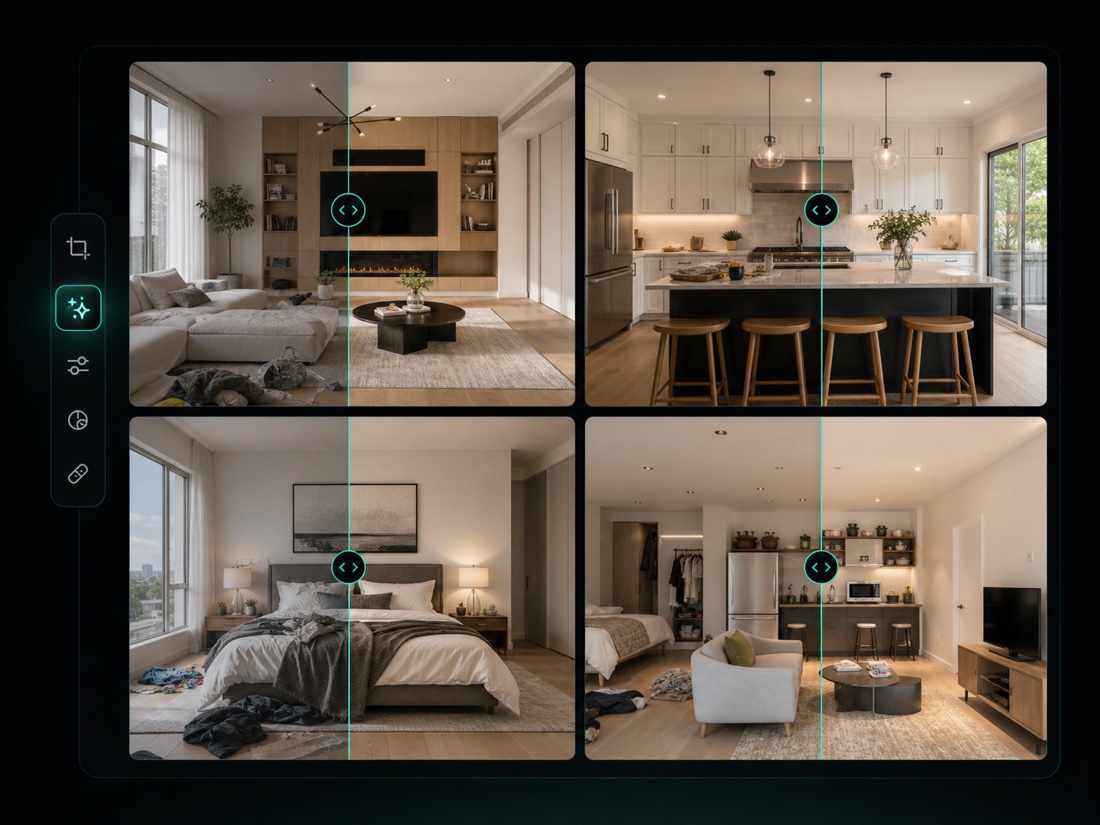
Upload several product or listing photos, apply one cleanup direction, then review the full set before export.
Key takeaways
- Batch cleanup works best when multiple photos need the same kind of edit.
- Product photos need conservative edits because buyers rely on color, texture, size, labels, and condition.
- Group images by job type before editing. Do not mix different products, lighting problems, and content changes in one batch.
- Use one narrow instruction, then inspect each image at normal size and zoomed in.
- If the edit changes product truth, reshoot or publish the original instead.
Table of contents
- When batch cleanup is the right tool
- When you should not batch edit
- Batch workflow that works
- Prompt examples for product photo sets
- What to review before publishing
- How this fits with ClearCrowds
- Sources
- FAQ
When batch cleanup is the right tool
Batch editing is useful when the repeated work is obvious and low risk. A seller may have ten photos from the same table setup. A real estate assistant may have a folder of room images with small cables, bags, or wall marks. A creator may have a set of marketplace photos where the product is already accurate, but the background needs small cleanup.
Good batch-cleanup candidates include:
- Dust, crumbs, lint, tape, cables, small props, or edge clutter.
- Phone shadows or hand shadows that do not hide important product details.
- Small background distractions around a product, room, table, sign, or flat lay.
- Repeated cleanup before resizing images for a listing, carousel, or product page.
- A folder of photos that need the same final style and review standard.
The important word is same. If image one needs shadow cleanup, image two needs a wrong price correction, image three needs privacy blur, and image four needs a background replacement, that is not one batch job. Split the photos into smaller groups.
When you should not batch edit
Do not batch edit photos that require a unique decision per image.
Avoid batch cleanup when:
- The edit could hide product damage, stains, missing parts, wear, or used condition.
- The photo needs exact color accuracy for fabric, cosmetics, art, jewelry, food, or collectibles.
- The image includes compliance labels, medical packaging, safety warnings, legal text, receipts, invoices, or regulated information.
- Each photo has a different correction target.
- The prompt would ask AI to invent product details, labels, logos, text, packaging, or material texture.
- You do not have time to review the final images one by one.
Google Merchant Center's image-link guidance stresses that product images should accurately show the item being sold and avoid overlays or promotional elements that do not belong in the product image. Shopify's product photography guide also treats consistency, clear lighting, and honest presentation as core parts of product-photo quality. That is the right mindset for batch AI editing: make the photo cleaner, not less truthful.
Batch workflow that works
Use a simple sequence:
- Put the original images in one folder and keep a backup copy.
- Remove photos that need a different edit or a reshoot.
- Group the remaining photos by product type, lighting setup, and cleanup target.
- Upload one group to the batch editor.
- Use one narrow instruction for the whole group.
- Review every output at normal size.
- Zoom into labels, edges, texture, shadows, and product condition.
- Export only the images that still represent the real item.
If a group has mixed problems, split it. Five photos with the same tabletop clutter are better than twenty photos with five different editing goals.
For ecommerce, the goal is not to make every image look perfect. The goal is to remove distractions that make a real product harder to understand.
Prompt examples for product photo sets
Use a prompt that names the repeated cleanup job and protects the product.
For small background clutter:
Remove small background clutter around the products. Keep product shape, color, labels, texture, shadows, and condition unchanged.
For phone shadows:
Lighten or remove the accidental phone shadow in these product photos. Preserve real texture, label text, color, product edges, and natural contact shadows.
For listing photos:
Clean only distracting objects in the background. Do not change the product, room layout, furniture, size, color, defects, labels, or buyer-relevant details.
For marketplace prep:
Make the photo set cleaner for a marketplace listing by removing small distractions. Keep the item accurate and do not make it look newer, larger, cleaner, or more complete than it is.
Avoid broad prompts:
Make all photos look professional.
That kind of prompt is risky because "professional" can mean too many things: brighter colors, smoother texture, cleaner labels, fake backgrounds, or altered product condition. Use a narrow cleanup instruction instead.
What to review before publishing
Batch output needs a quick but serious visual QA pass.
Check every image for:
- Product color: does it still match the original?
- Product shape: did edges, handles, lids, straps, or corners warp?
- Labels and text: did the editor rewrite, blur, or invent text?
- Texture: does paper, fabric, metal, glass, wood, or plastic still look real?
- Shadows: did the edit remove the accidental shadow while keeping natural grounding?
- Condition: did scratches, wear, stains, dents, or missing parts stay visible if they matter?
- Background: did the editor create fake objects or repeated patterns?
- Consistency: do all images in the set still feel like they belong together?
If a single output fails, do not export the whole batch blindly. Re-edit that image with a tighter instruction, move it into a smaller group, or leave it unedited.
How this fits with ClearCrowds
ClearCrowds is strongest when the job is specific. Use Batch Photo Editor when several images need the same cleanup direction. Use a preset or single-image workflow when one image needs a precise correction.
For common product-photo cases:
- If a phone shadow crosses a label or flat lay, read Remove a Phone Shadow From a Product Photo.
- If a visible price is wrong, use Change a Wrong Price in a Product Photo carefully.
- If the issue is general storefront cleanup, see AI Ecommerce Photo Editing.
- If the issue is a small object, try Remove Garbage.
- If the issue is lighting, try Remove Shadow.
The feature page should remain the main SEO entry for "batch photo editor" and "bulk image editor." This blog is narrower on purpose: it answers the scenario question a seller, listing assistant, or creator might ask before they know what tool to use.
Sources
- Google Merchant Center: image link requirements
- Shopify: product photography guide
- Etsy Seller Handbook: product photography
FAQ
Can AI batch edit multiple product photos at once?
Yes, when the photos share the same cleanup goal. Group similar images, apply one narrow instruction, and review every result before publishing.
Is batch photo cleanup safe for ecommerce images?
It can be safe when the edit removes distractions without changing product truth. Do not hide defects, alter color, rewrite labels, or make the product look different from what the buyer receives.
Should I use the same prompt for every product photo?
Only if the photos have the same problem. If each image needs a different fix, split the folder into smaller batches or edit those photos individually.
What is the fastest way to clean a photo set?
Use a batch editor for repeated cleanup, but keep the instruction narrow. For example, remove small background clutter while preserving product shape, color, labels, texture, and condition.
What if one image in the batch looks wrong?
Do not export it with the rest. Re-edit that one image with a tighter selection or prompt, or use the original if the AI result changes buyer-relevant details.
Summary
Batch AI editing is useful when a photo set has the same small cleanup problem. Keep the prompt conservative, group similar images, review each output, and protect the real product details that buyers rely on.